Switching server panels always meant a migration. A new server, files copied over, databases exported and imported, DNS moved, and a nervous evening somewhere in between. Starting today, you can skip all of that.
Ploi can now take over a server that Laravel Forge or ServerPilot set up. You keep the same machine and the same IP address, so there is no DNS change and no moment where visitors land on the wrong server.
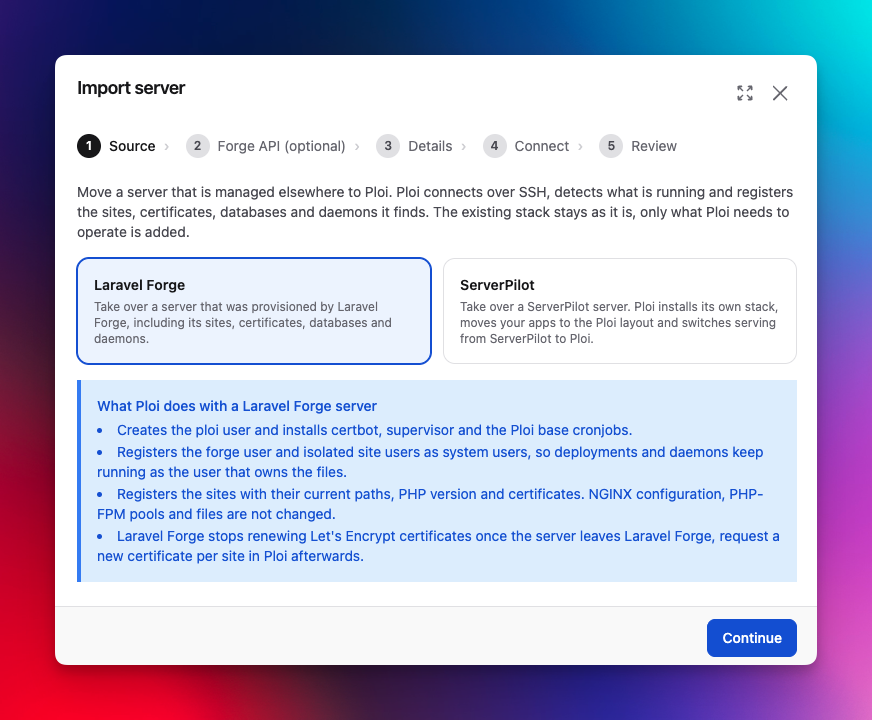
How it works
Open Servers, click Create server, and pick Import server. Choose where the server comes from, fill in its IP address, and run the command we show you as root. That command only adds Ploi's SSH key.
Ploi then scans the server. The scan only reads and changes nothing. You get an overview of what it found, tick the sites you want to bring over, and start the import. Every step shows up live while it runs, and on a small server the whole thing takes a few minutes.
Coming from Laravel Forge
A Forge server already looks a lot like a Ploi server, so most of this import is Ploi registering what is already there. It handles the older Forge layout as well as the one Forge switched to in October 2025.
Sites keep their directory, system user, and PHP version. The Forge user and isolated site users become Ploi system users, with the SSH keys they already have.
Certificates Forge issued keep working. Ploi rewrites the NGINX config into its own layout, checks it with
nginx -tfirst, and reloads NGINX instead of restarting it. From then on, renewals run through Ploi.MySQL and PostgreSQL databases and their users show up in the panel. Ploi never reads passwords from the server, so your applications keep their current credentials and you set a new password from Ploi when you need one.
Supervisor daemons, cronjobs and firewall rules move into the panel, and you manage them from there.
Ploi links the git remotes as repositories, so you can deploy right away with the deploy key that is already on the server.
Sites on Forge's zero-downtime deployments get converted to a regular site directory. The old releases stay on disk until you remove them.
Forge keeps deploy scripts in its own panel, out of reach for a scan. If you paste a Forge API token in the wizard, Ploi fetches each site's deploy script and translates the $FORGE_ variables to Ploi's own. We use the token for that one run and then throw it away.
The last step can remove Forge's access key and renewal scripts from the server. It is off by default, in case you want to keep Forge around for a while. When you are done there, archive the server in Forge instead of deleting it. Deleting a server in Forge can also destroy it at your provider.
Coming from ServerPilot
ServerPilot is a different story. It runs its own NGINX, Apache, and PHP stack from /opt/sp and keeps apps under /srv/users. Registering that as it is would leave you with a server Ploi can't really manage, so this import installs Ploi's stack and moves your apps onto it.
Ploi installs its stack next to ServerPilot's while ServerPilot keeps serving your apps.
Each app moves from
/srv/usersto/homeand keeps its PHP version. Its ServerPilot user becomes a Ploi system user.Databases and database users show up in the panel. The cronjobs your users added come along, with their paths rewritten to the new location.
Ploi then switches serving over to its own NGINX. Your apps are offline for that switch, about a minute.
The optional last step stops the ServerPilot agent. Its packages stay installed so you can go back, and this step is off by default too.
One thing to check afterwards. ServerPilot puts Apache behind NGINX, which is why .htaccess files work there. Ploi runs NGINX only, so if an app relies on custom .htaccess rules, those need translating to NGINX.
When the import is done
You get an email with what still needs your attention, such as deploy scripts to copy over or an NGINX config Ploi could not convert. If a step fails along the way, the server page has a Retry import button. The import is safe to run again and won't take anything over twice.
Want the full walkthrough first? Read how to migrate from Laravel Forge or how to migrate from ServerPilot.
Changelog
A lot more shipped since the last update. The highlights:
Added
Import servers from Laravel Forge and ServerPilot.
Roots Bedrock support for WordPress sites. Plugins, themes, WP-CLI, cronjobs and cloning now find WordPress in
web/wp, and Ploi detects the layout for you.Server monitoring notifications can wait until a threshold breach lasts a while, for example CPU over 80% for more than 60 minutes. Short spikes from bots and scrapers no longer send an alert every time.
Your own label for a team name. Only you see it, which helps when you're a member of someone else's team with a confusing name.
The source control overview marks Bitbucket and GitLab links that need re-linking, so you no longer find out through a failed deployment.
An API endpoint to download a site's certificate chain. The private key is never returned.
A reminder email for server imports that were set up but never started.
Improved
We rebuilt the connection debugger. It runs from the same Ploi servers that connect to yours and checks DNS, the TCP connection, the SSH banner, and a real key login one by one, so you can see exactly where the connection breaks.
The page of an unreachable server shows how long it has been down, the last SSH error, and every Ploi IP address to allow through your firewall.
New servers default to Ubuntu 26.04.
The database picker on the create server screen groups versions per engine.
Backup schedules are picked and shown in your own timezone.
Site pages load faster; the deployment list now loads after the rest of the page.
Fixed
Bitbucket kept asking you to re-link. Bitbucket hands out a new refresh token on every refresh since May 2026, and we now store it.
Picking MySQL 9 installed MySQL 8.4. It now installs the 9.7 LTS series.
File backups now fail instead of reporting success when folders are missing from the archive, and they clean up their temporary archives.
Cloning a WordPress site with the database option ticked now actually clones the database.
Site clones install rsync when it is missing, and clones to the same server no longer fail with "Permission denied (publickey)".
With HTTP/3 enabled, the site itself now listens on QUIC as well.
Scheduled scripts no longer skip a run when the runner starts late, and scheduled server updates no longer get skipped when their exact minute is missed.
Team invites are claimed when the invited person registers directly instead of through the invite link.
The open updates insight closes once the updates are installed.
The uptime percentage on the site monitor card is now calculated correctly.
Cronjobs are never written for a system user that does not exist.
Creating a server through the API now respects
ip_type.New servers no longer install the postfix MTA-STS resolver, which could crash-loop on Ubuntu 26.04. On an existing server you can remove it with
apt-get purge -y postfix-mta-sts-resolver.
Removed
Ubuntu 22.04 for new servers. Existing 22.04 servers keep working, and 22.04 has LTS support until April 2027.
MySQL 8.0, MariaDB 11.2, and PostgreSQL 13 and older for new servers, as these versions are past end of life. Existing servers keep running them.
That's it for this round. Missing a feature? Drop it on the roadmap.