After the interesting period we had a while ago about the PHP security issue, it's time for some good news, a proper update, and a changelog!
Running php artisan migrate on a site used to mean opening an SSH session, switching to the site's user, finding the right directory and hoping php pointed at the version the site runs on. As of today, every site has a Commands tab. You type the command in the panel, Ploi runs it on the server and you watch the output come in. Site commands are part of the Basic, Pro and Unlimited plans.
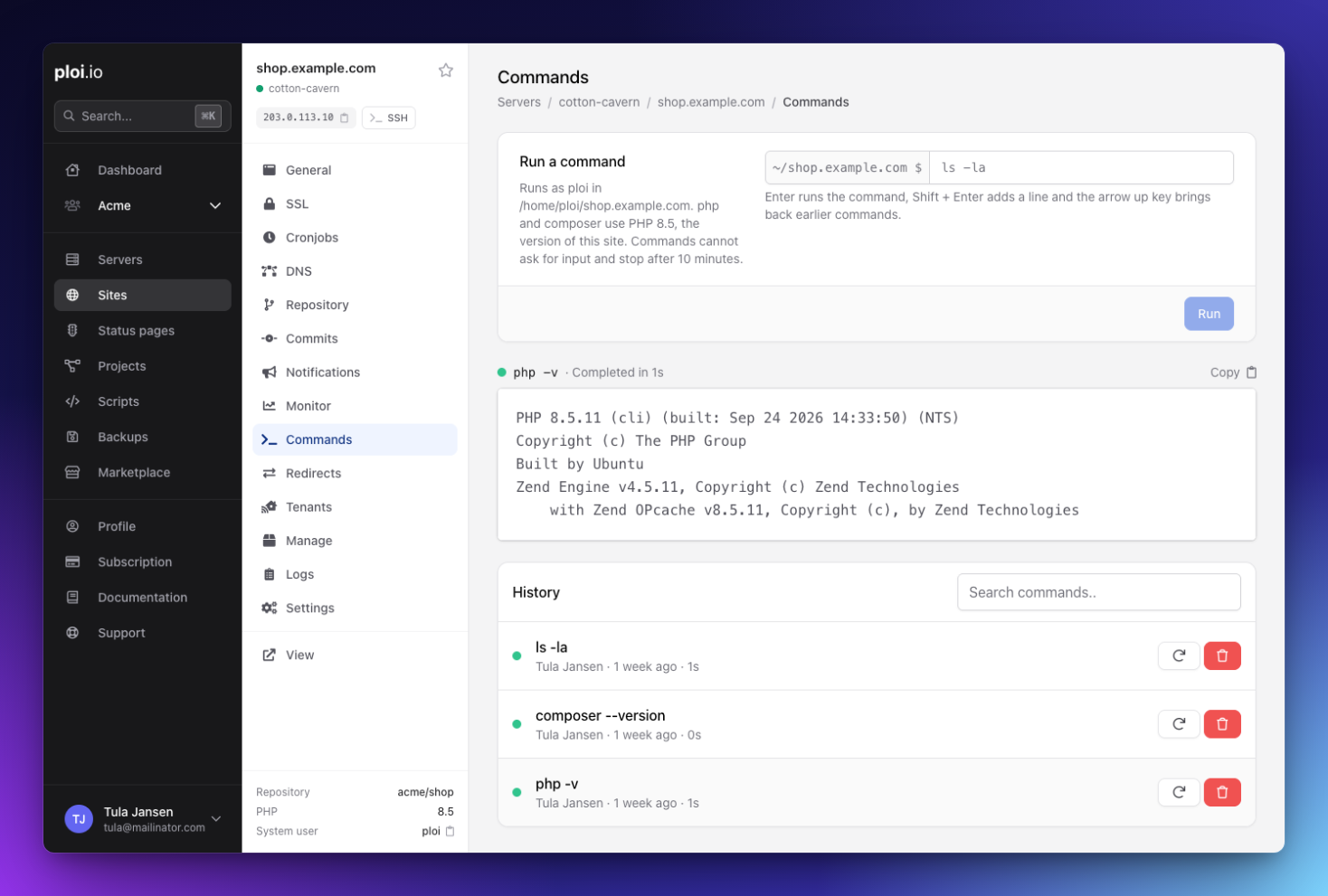
Running a command
Open a site and click Commands in the site menu. Type a command and press Enter. Ploi runs it as the site's system user, in the site's directory, and streams the output to your browser while it runs. php and composer use the PHP version of the site, so composer install uses the same PHP as the site itself.
Shift + Enter adds a line, for when you want to chain a few commands. The arrow up key brings back what you ran before. The input suggests a command that fits the site, such as php artisan about on Laravel or wp plugin list on WordPress.
History and stopping
Every run lands in the site's history with its output, who ran it and how long it took. Your team shares that history, so you can see who cleared the cache at 3 in the morning. The history keeps the last 50 runs per site. You can search it, run a command again with one click and remove runs you don't want to keep.
Did a command hang, or start something you didn't mean to? Click Stop. Ploi ends the command and every process it started.
Limits and who can use it
Commands can't ask for input, so add flags like --force or -n where a command would otherwise wait for a yes. A command stops after 10 minutes, and a site runs at most 3 commands at the same time. Anything that has to keep running belongs in a daemon.
The plan of the server's owner decides whether the tab works, so team members can use it on every server of an owner on Basic or higher. On the free Starter plan the tab shows what it does and how to upgrade. Teams get a new Run commands permission. Members with Manage sites get it too, and you can turn it off for a member while keeping Manage sites. Read how teams and permissions work for the details.
See every package on a server
A server's Manage page has a new Packages tab. It lists every installed package with its version, the pending update if there is one, its architecture and the repository it came from. Search with * as a wildcard, filter on a repository or show only packages with a pending update. Ploi reads the list from the server when you open the tab and doesn't install anything for it.
The PHP and Services tabs now show the full version of each PHP version, such as 8.4.11, so you can see whether a server already has the latest PHP security release.
Changelog
Here's everything else that shipped since the last update.
Added
A Commands tab on every site, on the Basic plan and up.
A Packages tab on a server's Manage page.
The full PHP version, such as 8.4.11, in the PHP and Services tabs of a server.
Two triggers for script actions on the Unlimited plan. Updates have finished runs your script after every update run. Updates upgraded packages only runs it when apt upgraded something, which fits
pm2 updateor a reboot when the update needs one.php_full_versionsin the API, on the servers list, a single server and the PHP versions endpoint.
Improved
After an update run, the panel shows the new update counts and the reboot notice right away. After the nightly updates they could lag behind for hours.
When an update run upgrades PHP, the new PHP version shows up right away instead of after the nightly check.
New servers show their real CPU and RAM as soon as the installation finishes. Until the nightly check, they showed 1 vCPU and 1 GB.
Server installations retry the Composer download up to 5 times. When the download failed, the installation used to finish without Composer.
Every server delete confirmation now has the same options, including the 30 minute window and keeping the server at your provider. Cancel the deletion of a server whose installation failed, and it goes back to that state instead of showing as active.
Ploi now hashes basic auth passwords with SHA-512. For users you added before, Ploi only checked the first 8 characters of the password. The basic auth modal marks those users, so you can delete them and add them again.
The debug mode warning now follows the site's
.envwhen you save it through the API or the environment sync, and a deployment clears it onceAPP_DEBUGis no longer true. Fix it for me only changes theAPP_DEBUGline now.Saving a deploy script over 64 KB tells you why it failed, instead of "Failed to save deploy script". WordPress repository deploy scripts and Docker Compose files get the same check.
Fixed
A database user password with a
$, a backtick or a backslash ended up different on the server than the one Ploi showed, so logging in failed with "Access denied". Ploi now passes passwords to MySQL, MariaDB and PostgreSQL unchanged.A MySQL root password with one of those characters broke database actions on the server. Ploi now quotes it in every command.
Every database action now checks the Manage database permission. Before, only the database page itself did.
Importing a database from an external MySQL or MariaDB server failed while Ploi reported it as done.
Basic auth on a path didn't cover PHP files in that path or the same path through
/index.php. Ploi now checks the password on every request for that path. Adding a user for one path no longer leaves the rest of a fully protected site open, and deleting a user no longer removes another user from the password file.When renaming a site's domain failed on the server, Ploi still showed the new domain and revoked the old certificate. Ploi now waits for the server to confirm the rename, and Settings tells you why a rename failed.
Requesting a DNS validated certificate with a different token could break the renewal of other certificates on the same server with "Unable to determine zone_id". Every new certificate gets its own credentials file now.
Dropbox site backups stopped rotating when an older archive was already gone from Dropbox, so the backup kept growing past its retention.
Turning on manual deployments for a site with a repository, or decoupling a production site from staging, could give the site a second repository. The site then showed as "Manual deployments" and lost its Repository menu.
Changing the trigger of a script action left the old trigger active, so a former boot action kept running on every boot.
Two update runs could start on the same server at once and block each other on the apt lock. A double click on a PHP patch button started two upgrades.
Server statistics and the monitoring API showed an error when Ploi couldn't load the monitoring data. They now show no data for that period.
Ploi now checks SSH login notifications before sending them. A notification goes out only for a valid IP address, and each server sends at most 10 a minute.
That's it for this round. Does a command behave differently in the Commands tab than over SSH? Contact support and we'll look into it. Missing a feature? Drop it on the roadmap.